
Quick Navigation:
The Challenge: Mixing Premium Gear
You've invested in a Fanatec or Thrustmaster wheelbase—excellent choice. But now you want to upgrade to elite pedals from specialists like:
- Heusinkveld (Ultimate+)
- Simagic (P1000, P2000)
- Conspit (CPP lite, CPP EVO)
The Problem:
These manufacturers create closed ecosystems. Connecting third-party pedals—especially on console—isn't straightforward.
The Question Every Racer Asks:
How do I make my best pedal setup work with my existing wheelbase?
PC Solution: Simple USB Method
For PC-Only Racers
If you only race on PC, you're in luck—it's simple.
How it works:
- Connect wheelbase → USB port 1
- Connect pedals → USB port 2
- Open your sim (iRacing, ACC, rFactor 2, etc.)
- Assign controls:
- Steering → Wheelbase
- Throttle/Brake → Pedals
✅ Advantages:
- No extra hardware needed
- Plug and play
- Works with all PC sims
❌ Critical Limitation:
- Does NOT work on PlayStation 5 or Xbox
- Console games require all inputs through the wheelbase
Console Solution: Pedal Control Box
The Only Real Solution for PS5/Xbox
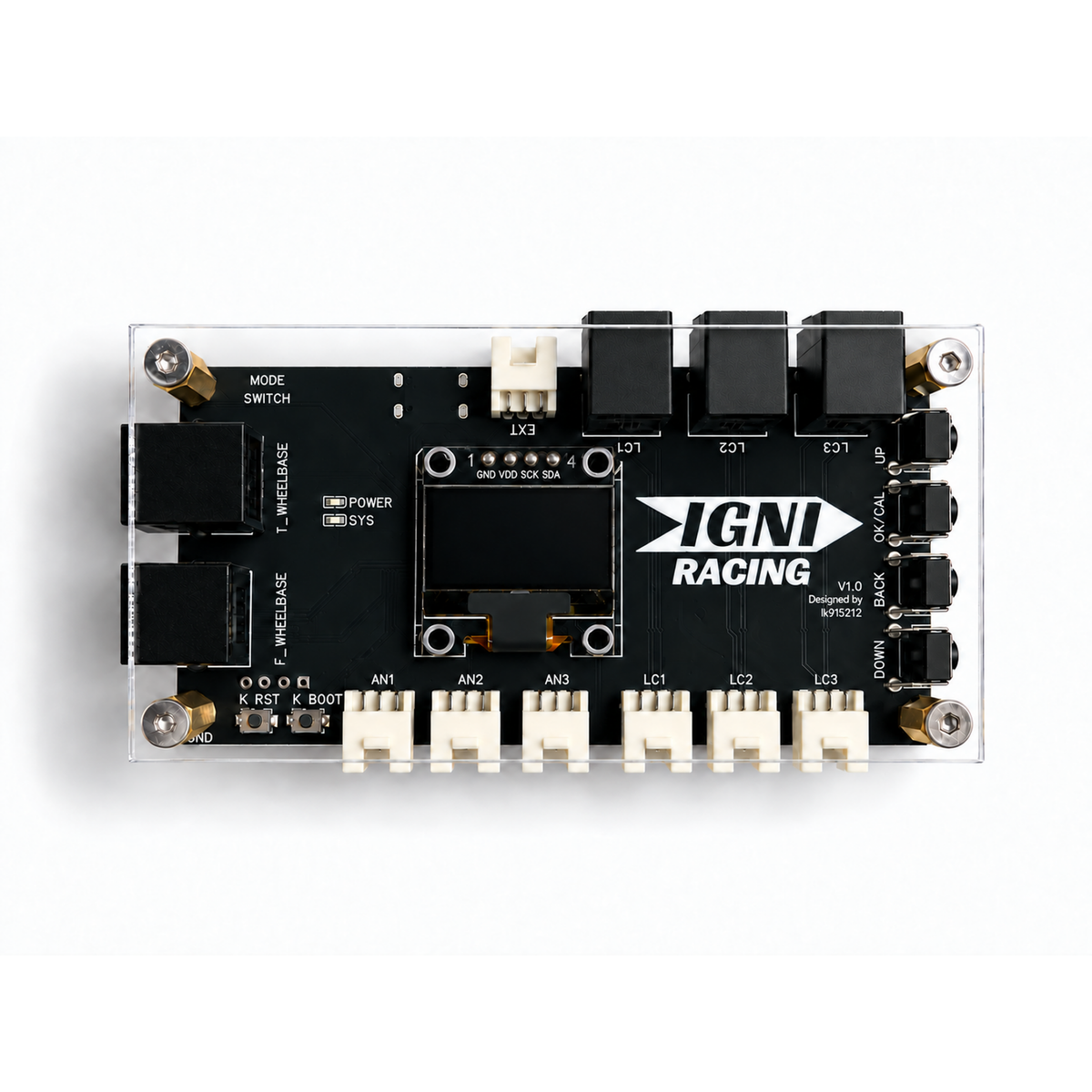
For console racers or those wanting universal compatibility, you need a dedicated pedal control box.
What Is a Pedal Control Box?
An intelligent adapter that translates signals from your high-end pedals into a format your Fanatec or Thrustmaster wheelbase understands natively.
Think of it as: A translator between two languages (pedal signals ↔ wheelbase protocol)
Why Choose a Pedal Control Box?
Core Benefits
1. True Console Compatibility ✅
The main reason most people need this:
- Makes third-party pedals work on PS5 (Gran Turismo 7)
- Works on Xbox Series X/S
- Your wheelbase sees the pedals as "native" hardware
2. Broad Pedal Compatibility 🔧
Works with major brands:
- ✅ Heusinkveld
- ✅ Simagic P-series
- ✅ Conspit
- ✅ Any other Heusinkveld-like pedals(Simnet, Simsonn, Simjack, etc. )
3. Advanced Tuning Features 🎛️
Goes beyond basic compatibility:
- Custom curve mapping - Fine-tune pedal response
- Dead zone adjustment - Eliminate unwanted input
- Sensitivity control - Match your driving style
4. Universal Setup 🌍
- one solution for all platforms
- No software installation required
- Plug-and-play operation
Real-World Use Cases
Scenario 1: GT7 on PS5 with Heusinkveld Pedals
Problem: Heusinkveld Ultimate+ pedals don't work directly with PS5
Solution: Control box makes them appear as Fanatec pedals
Result: Full compatibility + custom brake curve for trail braking
Scenario 2: Simagic Pedals + Thrustmaster Wheelbase
Problem: Different ecosystems don't talk to each other
Solution: Control box bridges the gap
Result: Best-of-both-worlds setup
Frequently Asked Questions
Q: Will this work with my Fanatec DD Pro on PS5?
A: Yes! The control box is specifically designed for Fanatec wheelbases on PS5, including DD Pro.
Q: Can I use this with Thrustmaster T300/T-GT?
A: Absolutely. Works with all Thrustmaster wheelbases that have a pedal input port.
Q: Does it add input lag?
A: No. The control box processes signals in real-time with no perceptible lag (<1ms).
Q: Do I need to install drivers or software?
A: Nope! It's completely plug-and-play. Just connect and race.
Q: Can I adjust pedal curves?
A: Yes, our control box includes advanced curve mapping features accessible via a simple configuration tool.